
Vet guests before confirming bookings, then communicate rules clearly and provide a digital guidebook with policies. Install reliable safety devices—smart locks, smoke/CO alarms, noise monitors, cameras, leak detectors, smart thermostats, fire extinguishers—and stay compliant with local licensing and insurance.
We've hosted for more than a decade now, between our row house in Washington, DC and our properties in Mexico's Riviera Maya. Most of what keeps a rental safe is decided before the guest ever walks through the door. The smart lock matters. The smoke alarm matters. The booking you turn down matters more.
This is the system we actually run, in four parts: vet your guest, communicate your policies, install the right devices, and keep your paperwork in order.
What are the most important safety tips for Airbnb hosts?
Vet every guest before the booking is confirmed, put your rules where guests can't miss them, install a core set of safety devices (smart lock, smoke and CO alarms, noise monitor, leak detectors), and keep your license and insurance current. Work in that order. A problem caught at the booking stage costs you a message; the same problem mid-stay can cost you a claim.
1. Start by vetting your guest
Check the profile first
When a booking request comes in, read the guest's profile and the reviews other hosts have left. If the booking comes from a channel that doesn't verify IDs, verify identity yourself before confirming.
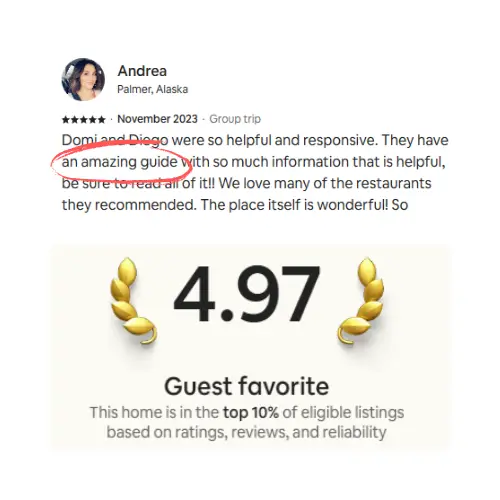
Airbnb also lets you restrict Instant Book to guests with a good track record, meaning they've completed a stay without incidents or negative reviews. Everyone else has to send a request you can accept or decline. We have this switched on for all of our homes and it buys real peace of mind. One caveat: Airbnb has trimmed its Instant Book guest requirements over the years (the old "verified ID only" option is gone), so the track-record setting plus a required booking message is what you get. Having hosted on several platforms, we still think this feature sets Airbnb apart on safety.

Set clear rules and expectations
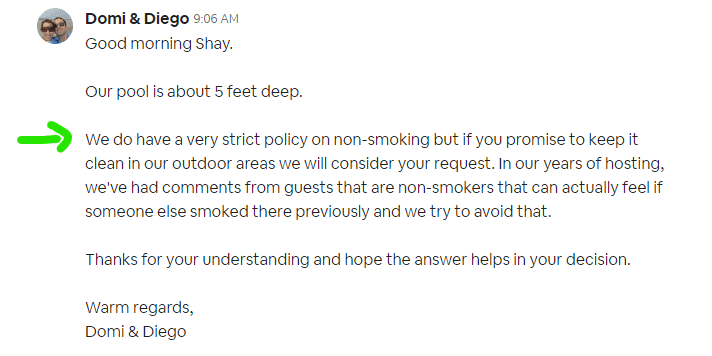
No smoking, no parties, no pets, shoes off inside, quiet hours. Whatever your rules are, guests should see them before they book, and again before they arrive. Just make sure you are telling you’re tell them why they are important and in a friendly manner.
Back the listing rules with a full vacation rental agreement that guests accept during the booking process.
A guest's first message is telling
The first message a guest sends can be the difference between accepting a stay and declining it. After years of hosting, we can usually read intent from how a guest writes and what they ask for. What you want to know is simple: why is this guest coming, and with whom? Here's how we handle three situations that come up again and again:
New profile, no reviews, no first message. We probe: "We always like to know who is staying in our home and how we can help our guests take advantage of everything our home has to offer. We notice that you have a new profile on this platform. Would you mind telling us briefly a little bit about yourself and your guest party? Who is coming? Is this trip for a special occasion? Is this your first time in DC?" Their response usually tells you what you need. Keep probing until you're satisfied. After all, it's your property, and proper guests understand that very well.
Guest asks "really, no smoking, even on the balcony?" On a new profile, that's a problem. At least they've read your house rules, but nothing guarantees they'll respect them. Hold the line. If the guest has positive reviews you can decide to flex, but we don't advise it with unreviewed guests; you have no way to know how they behave.
Guest books, sends nothing, and ignores messages and calls. Unacceptable for us, reviews or not. You can't invite someone into your home who won't talk to you. Be careful here: cancelling as a host usually triggers penalties, so ask the platform to mediate and have the guest cancel. Airbnb support is usually helpful. VRBO, in our experience, less so: we were once forced to cancel an unresponsive guest's booking ourselves, took the penalty, and lost our Premier status. Honestly, there is no price on our peace of mind.
2. Communicate your policies at every turn
Be reachable, especially in emergencies
Make it obvious how guests can reach you, and answer fast. For real emergencies, have local support who can be at the property within the hour at any time of day, plus a standing list of 24-hour providers: plumber, electrician, A/C service.
Repeat your rules in more than one place
Guests don't absorb rules in one pass. We put them everywhere it counts:
In the public listing, fully disclosed at the end.
In the legal agreement guests accept at booking. Some hosts have guests sign a physical copy at check-in; we capture acceptance digitally instead (SmoothStay's guest registration widget records consent for us).
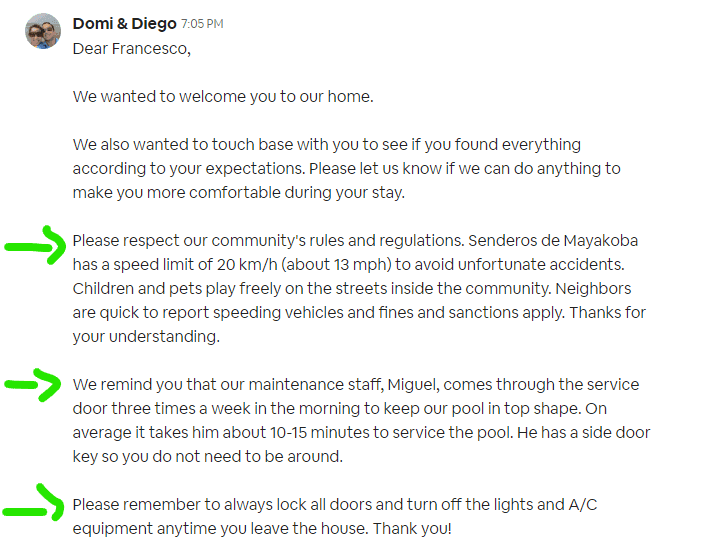
In scheduled messages. We embed our most important policies in the automated welcome message our channel sends at check-in; below is what a guest sees when arriving at one of our properties. This scheduling lives in Airbnb or your PMS, whichever you message through.
In your digital guidebook. House rules, emergency contacts, and your checkout policy belong in the guidebook guests open on their phone during the stay. If you're starting from scratch, here's how to build a guidebook your guests actually use.
On the walls. Frames, signs, or a notice behind the front door still work.
For the messaging cadence itself (what to send before arrival, at check-in, mid-stay, and at checkout), we've answered the most common guest communication questions separately.
3. Install safety devices and keep emergency supplies
Ten years in, this is the stack that has survived across our properties:
Device | What we run | Where |
|---|---|---|
Smart lock | Schlage + Alarm.com (7 years), Ultraloq U-Bolt Pro | DC / Mexico |
Noise monitor | NoiseAware | All properties |
Outdoor cameras | Google Nest / Wyze | DC / Mexico |
Leak detectors | Wifi leak sensors | Under sinks, problem toilets, near A/C |
Thermostat | Smart thermostat | All properties |
Use a smart lock
A smart lock means a unique code for every guest and no keys floating around. We use a Schlage smart lock connected to Alarm.com in Washington, DC; it has worked for seven years without a glitch. In Mexico we run the Ultraloq U-Bolt Pro, and so far so good.
Install smoke detectors and carbon monoxide alarms
Put them in every bedroom and common area, test them on a schedule, and connect them to the fire department if that's available in your area. Airbnb strongly urges hosts to install both and runs a free smoke and CO alarm program for active hosts who don't have one yet.
Use a noise monitoring device
Noise monitors track decibel levels, not conversations: no recordings, no transmitted audio. They alert you when noise crosses a threshold so you can deal with it before the neighbors do. We've used NoiseAware for years; it works great and their customer service is amazing. Airbnb permits decibel-only monitors in common spaces with disclosure; ours are disclosed in our legal agreement and a section of our public listing.
Outdoor cameras: know the current rules
The rules changed in 2024 and a lot of older advice is now wrong. Since April 30, 2024, Airbnb bans indoor security cameras entirely, no matter where they point or whether they're switched off. We agree with the new rules. Outdoor cameras are still allowed, but you must disclose their presence and general location before guests book, and they can't watch spaces with a higher expectation of privacy, like an enclosed outdoor shower. Doorbell cameras remain fine. We've run Google Nest cameras in Washington, DC and Wyze cameras in Mexico for years (now Ring cameras), disclosed in our agreement and in the listing.
Set up motion-activated lighting
Lights that switch on when someone approaches make the property harder to approach unnoticed. Guests fumbling for the keypad at midnight will thank you too.
Keep emergency supplies on hand
First-aid kit, flashlights, spare batteries, and a fire extinguisher. Tell guests where they live; supplies nobody can find don't count.
Add leak detectors
These have saved us from major damage more than a few times. Wifi leak detectors alert you and your guests the moment plumbing starts leaking, before water damage and mold get going. Ours sit under the kitchen sink, next to a few problematic toilets we have, and near the A/C equipment. Yours go wherever your property worries you most.
Install a smart thermostat
Control the temperature remotely, keep guests comfortable, and get alerted when something malfunctions. In a DC winter, a thermostat alert is also your early warning against frozen pipes.
Get fire extinguishers and mark your exits
Buy the right class of extinguisher for your jurisdiction, maintain it, and have it inspected on schedule. Cities that license vacation rentals often require this. Guests also need to know where the extinguisher is and how to use it: post instructions next to it, and repeat them in your guidebook along with floor maps and clearly marked emergency exits.
4. Stay compliant and properly insured
Get a license if your area requires one
Research local regulations before you list. Depending on the city, that can mean permits, licenses, certifications, or changes to bring the property up to code. Licensing rules are also where mandatory safety equipment (alarms, extinguishers, posted exits) usually shows up.
Get insured for short-term renting
Check whether your homeowner's insurance covers vacation rental operation. Most standard policies don't, and you'll need to replace or extend coverage. Options include home-sharing endorsements, dedicated short-term rental policies, and liability coverage on top. Choose based on the size and type of your property, how many guests you host, and the risk profile of your location.
FAQ
Are security cameras allowed in an Airbnb?
Indoors, no. Airbnb banned all indoor security cameras as of April 30, 2024, regardless of location, purpose, or prior disclosure. Outdoors, yes: disclose their presence and general location before booking and keep them away from privacy-sensitive areas like enclosed outdoor showers. Doorbell cameras and decibel-only noise monitors are allowed with disclosure.
What safety devices does Airbnb require?
Airbnb doesn't enforce a universal equipment list; local regulations set the legal minimum. Airbnb strongly urges smoke and carbon monoxide alarms (active hosts can request a free combined alarm) and recommends a fire extinguisher, a first-aid kit, and clearly marked exits. Licensed jurisdictions often make several of these mandatory.
How can I screen Airbnb guests before they book?
Use Instant Book's guest requirements so only guests with a completed, incident-free stay can book instantly; everyone else must send a request. Then read the profile and reviews, and ask early questions: who's coming, why, and for what occasion. A guest who won't answer is telling you something.
Do noise monitors record my guests' conversations?
Devices like NoiseAware measure decibel levels only; they don't record or transmit audio. Airbnb permits them in common spaces as long as you disclose them, and disclosing in your listing and rental agreement is good practice anyway.
Does my homeowner's insurance cover Airbnb hosting?
Usually not. Most standard homeowner's policies exclude commercial activity, which short-term renting is. Look at home-sharing endorsements or a dedicated short-term rental policy, and confirm liability coverage for guest injury. Platform guarantees are a backstop, not a policy.
Safety is mostly unglamorous: a declined booking here, a $40 leak detector there, an extinguisher inspection on the calendar. Do the boring parts and the dramatic parts mostly never happen. And if you'd rather not build the in-stay safety layer yourself, the house rules, emergency contacts, extinguisher instructions, and floor maps can all live in a free digital guidebook you can have running in under an hour.
Latest articles

How to Automate Check-In Instructions for Short-Term Rental Guests
Automate check-in instructions for short-term rental guests: the four-send sequence, what goes in a message versus a guidebook, and a copy-ready sample.

Vrbo Premier Host in 2026: Every Listing Now Stands on Its Own Record
Vrbo Premier Host requirements changed in 2026: per-listing scoring, tighter thresholds, quarterly checks. What each one means, and how it compares to Superhost.
Booking.com Guest Messaging Rules: What Hosts Can Send, When, and Why Links Get Removed
Booking.com guest messaging rules, verified at source: how long you can message a guest, why your links get removed, and what the partner terms say.
Vrbo's New Features for Fall 2026: What's Live, What's Gated, and What's US-Only
We sorted Vrbo's new features for fall 2026: what is live globally, what is gated behind eligibility, and what is US-only. Verified against Vrbo's own pages.