

Effective communication can make or break your vacation rental business. Guests expect clear, timely, and helpful responses, and this directly impacts your bookings and reviews. Managing multiple properties or platforms? The right tools and strategies can make communication easier without losing the personal touch.
We've been answering guest messages since 2015, first from a row house in Foggy Bottom in Washington DC, then across the properties we run and co-manage in the Riviera Maya. After a decade of it, you stop seeing a thousand different questions and start seeing the same handful, asked at the same few moments. Get ahead of those, and the rest of your inbox goes quiet.
This is how we handle guest communication across our properties, and what we'd tell any host trying to sound responsive without being chained to their phone.
What's the best way to communicate with vacation rental guests?
Meet guests on the channel they're already using for each stage of the trip: the booking platform's inbox before arrival, a quick text for anything time-sensitive, and a digital guidebook they open on their own phone for everything else. Answer the predictable questions before a guest has to ask, reply fast when something does come up, and keep one personal line open for the genuinely hard stuff. The exact mix matters less than the timing.
The rest of this post is how that works in practice.
Most "questions" are the same five questions
Before you pick channels or tools, look at what guests actually ask. How do I get in, what's the wifi, how does the AC work, where do I park, how do I check out. A small set covers the large majority of your inbound. The hosts who feel buried in messages are usually answering those five by hand, one guest at a time, on five different threads.
So the real goal isn't typing faster. It's answering each predictable question once, in a place the guest can reach without you, and saving your actual attention for the messages that need a human. Everything below is built around that one idea.
Match the channel to the moment
Each channel is good at one thing and clumsy at the rest. Use them for what they're built for instead of forcing everything through your Airbnb inbox.
Channel | Best for | Watch out for |
|---|---|---|
Booking platform inbox (Airbnb, Vrbo, Booking.com) | Pre-arrival logistics and anything you want kept on the record | Guests stop checking it once they've arrived |
SMS / WhatsApp | Time-sensitive updates: a late cleaner, a gate change, "your code is live now" | Bad for long instructions; keep it to a line or two |
Phone call | Real problems and emergencies, where tone matters | You can't be on call 24 hours, so set the expectation |
Digital guidebook | Self-service answers the guest can pull up anytime, in their language | Most need internet to load, so get them to open it early |
A simple rule sorts most of it: if a message is something the guest will need to look up again later, like the door code or the checkout steps, it belongs somewhere permanent like the guidebook, not buried in a chat thread they have to scroll back through at 11pm.
Sequence your messages across the stay
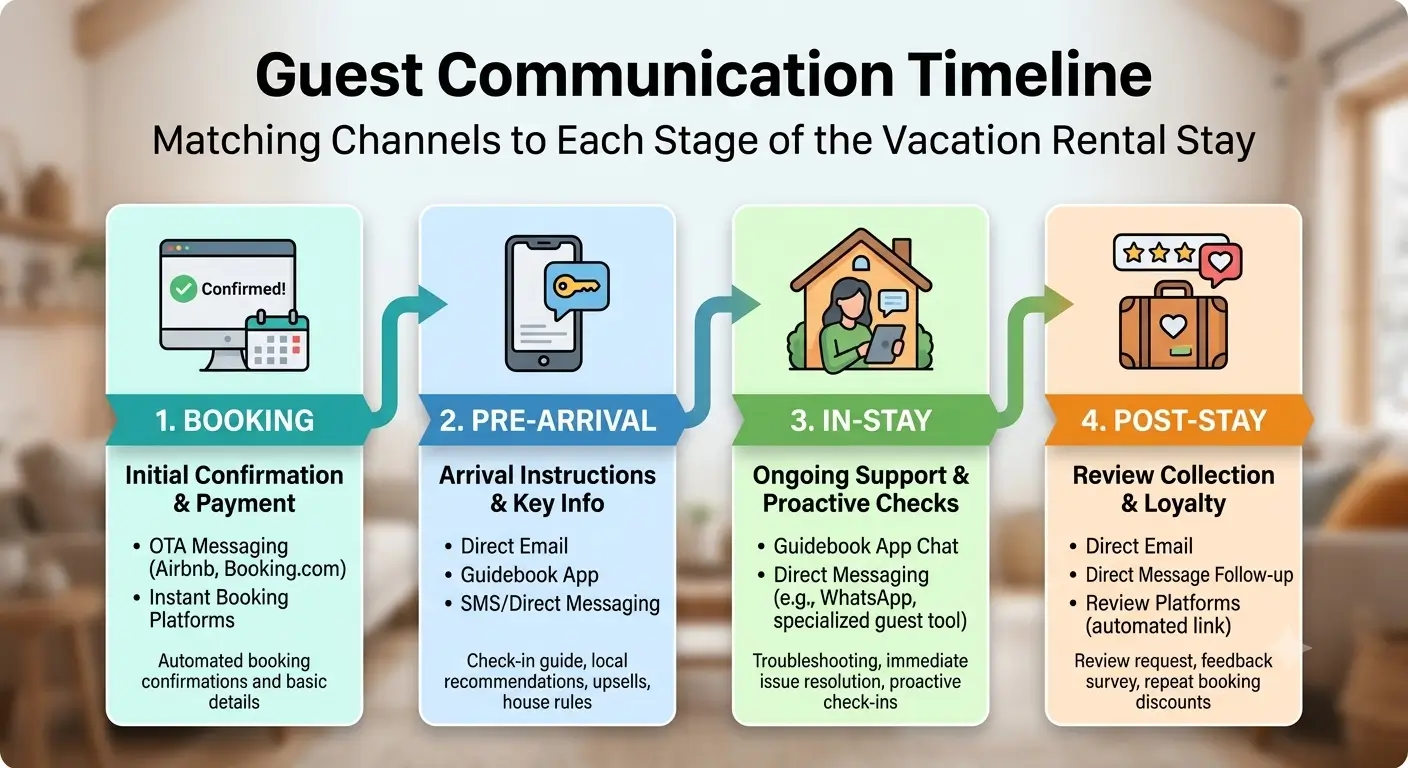
Good communication is timed, not front-loaded. The host who sends one giant message at booking buries the door code under restaurant tips, and the guest ends up messaging anyway. Send the right thing when the guest actually needs it:
At booking: a short, warm confirmation with their name and the dates with a deep link to our guidebook’s local recommendations section.
24 to 48 hours before: check-in steps with photos, parking, and the guidebook deep link to check in instructions.
Just after check-in: a quick "everything good?" and how to reach you.
The night before checkout: the checkout steps in order, so there are no 7am surprises.
You don't want to send these by hand at midnight. Most booking channels and property-management systems can fire timed messages on a schedule, triggered by each booking. We run our properties on Hospitable and trigger our milestone messages there, so the sequence goes out whether or not we're awake. Set it up once and it runs in the background for every reservation after that.
Let a guidebook absorb the repeat questions
This is the part that makes the inbox quiet. A real digital guidebook holds the answers to those predictable five and a hundred smaller ones: appliance photos with a couple of plain sentences each, the wifi name and password big enough to read, the gate code, checkout in order, and the local picks you'd actually text a friend. The guest scans a QR code or taps a link, and there's nothing to download.
We built SmoothStay to do exactly this on our own properties, and the AI concierge sits on top of the guidebook, so a guest who asks "what's the wifi?" at midnight gets the answer pulled straight from what you've written, without waking you. For guests reading in another language, the guidebook translates into 100+ languages on its own, which shows up in reviews more often than you'd expect. We won't re-explain how to build one here; our guide to a guidebook your guests actually use walks through it section by section.
One honest constraint: a digital guidebook needs a connection to load, so don't promise guests it works offline. For rural or weak-signal properties, nudge guests to open it on the drive in, and leave a printed one-pager with the basics in the welcome envelope as a fallback.
Where automation helps, and where it doesn't
Automation earns its place on the routine stuff: the scheduled milestone messages above, and an AI concierge answering the same handful of questions on repeat. Both of those run today through your channel or PMS and a guidebook with a concierge on top. That combination already covers a real share of what hosts used to do by hand.
Scheduled sends and a single unified inbox across Airbnb, Vrbo, and Booking.com are PMS territory and you should take advantage of it.
Automation should never touch the sensitive moments. A guest reporting a real problem wants a person, fast. Our rule is to acknowledge within a few minutes even when the fix takes longer: "Thanks for flagging the wifi, I'm calling the provider now and will update you within the hour." A fast human reply beats a slow perfect one almost every time, and it's the difference between a guest who feels handled and one who's already drafting the review in their head.
Protect the relationship the channel owns
One trap is worth calling out directly. If your booking came through Airbnb or another OTA, the post-stay message is not the place to push the guest toward an off-platform review or your own booking site. That breaks the channel's rules and reads as needy. A smooth stay produces a great review on the platform on its own. That's the whole mechanism, and it's a better one.
For guests who booked direct, or came through a channel that allows it, you can collect contact details with consent and keep a small list you actually own. SmoothStay's Guest Registration handles the consent capture, and OTA Compliance Mode decides what each guest sees based on how they booked, so an Airbnb guest never gets an ask the channel doesn't permit, while a direct guest does. If you're working on the review side of all this, we go deeper in our post on fixing poor reviews with better communication.
FAQ
What's the most important thing in guest communication?
Speed of acknowledgment. Reply fast even when you don't have the fix yet, because most negative reviews trace back to a guest left waiting or guessing, not to the problem itself. A quick "I'm on it" buys you the time to actually solve the thing.
How do I reduce the number of guest messages I get?
Answer the predictable questions before they're asked. Put the door code, wifi, appliance how-tos, parking, and checkout into a digital guidebook the guest can open on their phone, and most of the routine inbound stops. An AI concierge sitting on top of the guidebook catches the rest at odd hours.
Should I automate my guest messages?
Automate the routine, keep the sensitive personal. Scheduled milestone messages (confirmation, check-in, checkout) and an AI concierge for repeat questions save real time. Anything emotional or urgent, like a complaint or an emergency, should get a human reply, and a fast one.
What's the best channel to talk to guests on?
There isn't a single best one. Use the booking platform inbox for pre-arrival logistics, a text for time-sensitive updates, a guidebook for self-service answers, and a phone line for emergencies. Match the channel to the moment instead of forcing everything through one.
Can I move my Airbnb guests to direct booking through messaging?
No. Pushing an Airbnb guest off-platform mid-booking violates the channel's rules and risks your account. Run a great stay, collect contacts with consent where it's allowed, and build the direct relationship honestly over time instead of poaching in the inbox.
If you'd rather not format self-help questions and answers for your guests manually, you can have a SmoothStay guidebook, with the AI concierge answering guest questions for you, running on a property in about an hour. Free tier, no card needed.
Latest articles

How to Automate Check-In Instructions for Short-Term Rental Guests
Automate check-in instructions for short-term rental guests: the four-send sequence, what goes in a message versus a guidebook, and a copy-ready sample.

Vrbo Premier Host in 2026: Every Listing Now Stands on Its Own Record
Vrbo Premier Host requirements changed in 2026: per-listing scoring, tighter thresholds, quarterly checks. What each one means, and how it compares to Superhost.
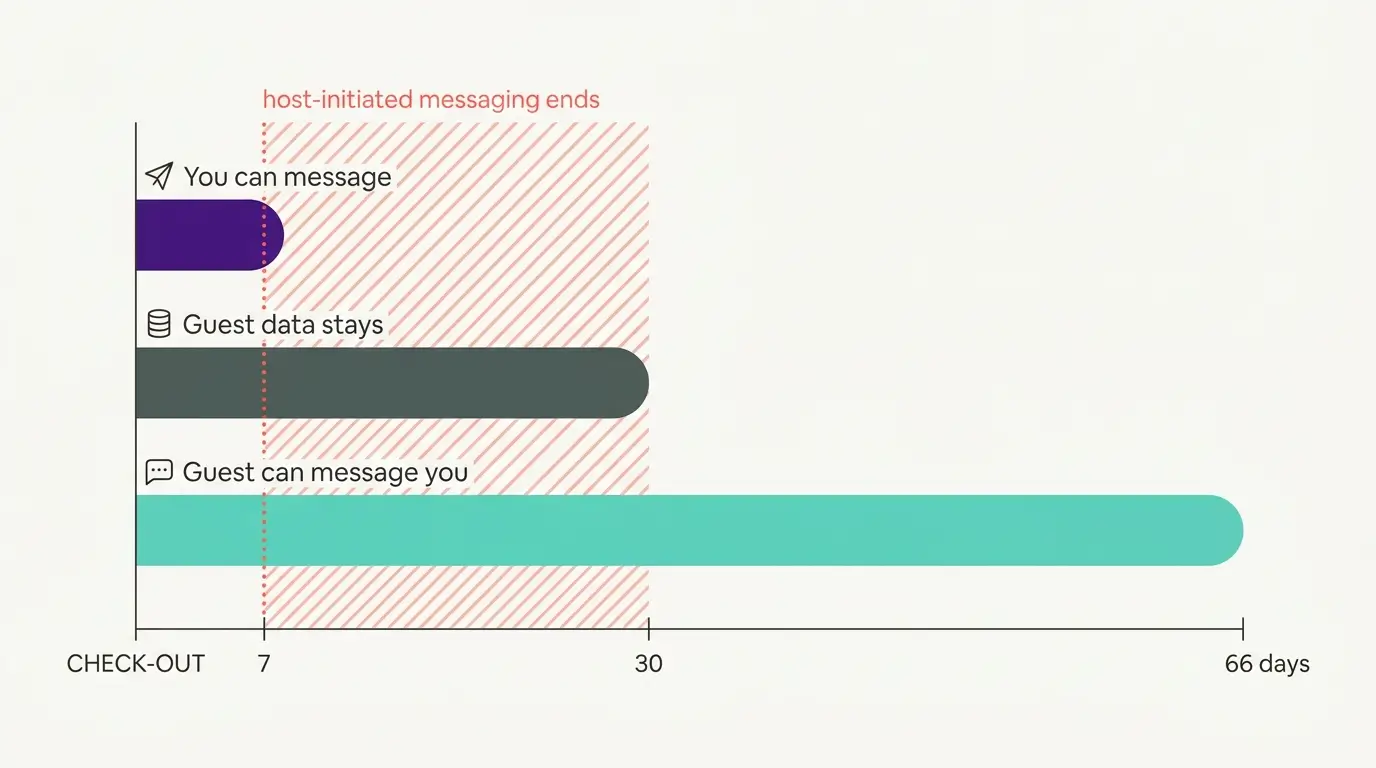
Booking.com Guest Messaging Rules: What Hosts Can Send, When, and Why Links Get Removed
Booking.com guest messaging rules, verified at source: how long you can message a guest, why your links get removed, and what the partner terms say.
Vrbo's New Features for Fall 2026: What's Live, What's Gated, and What's US-Only
We sorted Vrbo's new features for fall 2026: what is live globally, what is gated behind eligibility, and what is US-only. Verified against Vrbo's own pages.