

A property management system is not required to host on Airbnb. With one listing on one channel, Airbnb's scheduled messages, calendar links and co-host permissions cover the work, and some hosts run several listings on Airbnb alone. The threshold is the second channel, where calendars start copying each other on a delay. This guide shows what a PMS does, where Airbnb's own tools run out, and what to set up first if you run without one.
We sell software to hosts, so here is our interest up front: SmoothStay is a digital guidebook, not a PMS, and it works with one or without one.
We have hosted both ways. Our first house ran on Airbnb and Vrbo for two years with no PMS, and we use one every day now.
Do you need a PMS for Airbnb?
If you have one listing on one channel, no. Airbnb’s own tools cover messaging, the calendar and co-hosts well enough that a PMS adds a cost and a setup project you may not need yet. The threshold is the second channel: once you list on two, a PMS usually pays for itself, because it keeps the calendars in step for you. With several listings on Airbnb alone you can still run without one, though we prefer a PMS from the second property.
Airbnb’s own housing page says three in four hosts share one home. It does not say how many of them list on a second channel, but one home is the common case. The threshold in this post is a rule of thumb from our own hosting, and the sections below show where it bends. Airbnb also updates its tools and policies periodically, so check the latest host guidance before you change your setup.
What a PMS actually does
PMS stands for property management system. Strip away the feature lists and most of them do four jobs.
Channel management. One calendar and one set of rates, pushed to every site you list on.
One inbox with automated messages. Guest messages from every channel in one place, with templates that send on a schedule.
Operations. Cleaning and maintenance tasks created from bookings and shared with whoever does the work.
Money and reporting. Payouts, owner statements and occupancy across properties.
Many also bundle pricing tools, a direct booking site or a guest portal. None of the four jobs is exotic. What you are deciding is whether you have enough of each to need software for it.
What Airbnb already does on its own
More than it did when we started, and that includes a guidebook. At the time of writing, Airbnb’s help pages describe these tools for a host who runs on Airbnb alone.
Job | Airbnb on its own | Where it runs out |
|---|---|---|
Messages | Scheduled messages (Airbnb currently calls them scheduled quick replies) that send on triggers such as a new reservation, check-in or checkout | They live inside Airbnb. A second channel means writing and maintaining a second set. |
Calendar | Calendar links that import bookings from another site | The import runs every few hours, so there is a window where both sites can show the same night as open. |
Help | Co-hosts with three permission levels, from calendar-only to full access | It covers people working inside Airbnb. Your cleaner’s schedule and your other channels sit outside it. |
Guest information | A guidebook for local recommendations, plus a house manual and an arrival guide for the stay | Only Airbnb guests see them, and the content stays inside Airbnb. As we use them they are mostly text, so an oven or a fridge is hard to explain. |
Two details are worth reading on those pages yourself. The scheduled messages page says some messages are skipped by default for last-minute bookings and short stays unless you switch an option on. The calendar page says nights you block by hand on another calendar may or may not carry over to Airbnb. Read both before you rely on them.
Where the manual work piles up
We listed our four-bedroom row house in Washington DC at the end of 2015. We started on Airbnb and Vrbo, and for the first two years we ran both with no PMS.
We kept the two calendars in step with iCal links: Vrbo’s calendar imported into Airbnb, and Airbnb’s into Vrbo. As we remember it, a sync could take four to eight hours back then, and some days it was not reliable, so a double booking was possible whenever two guests looked at the same nights in that window. We never had one. That was about ten years ago and both platforms have changed since, but the setup is still two calendars copying each other on a schedule.
So two channels without a PMS is doable, and the cost is attention. Sync we could not fully trust is the main reason we would not run two channels by hand today.
After those two years we added Tokeet, our first PMS. Today we run on Hospitable.
One listing, one channel
Airbnb is enough
Scheduled messages
One calendar, nothing to sync
More listings, one channel
Still workable
Check-in details per property
A cleaning schedule for each
Two channels
Get a PMS
Calendars sync on a delay
Every message kept twice
Here is how we would describe each stage now.
One listing, one channel
Everything lives in one app. Scheduled messages handle the booking thank-you and the reminders before check-in and checkout. There is no second calendar to drift. If someone helps you, a co-host seat covers it.
More listings, one channel
The calendar is still simple, because there is only one. What grows is upkeep: each property has its own check-in details and cleaning schedule, and its own set of scheduled messages to maintain. Some hosts run five listings on Airbnb alone this way, and on one channel that works. Our own preference from the second property is a PMS, because scheduling messages for two properties is where the time goes.
Two channels
This is the threshold. The link between the two sites updates on a schedule, so a booking on one takes a while to close the night on the other. That window matters most for same-day and next-day stays. We don’t accept same-day bookings, which takes the sharpest edge off it. Every message template also exists twice, and so does every edit. One listing on two channels is doable by hand, as we did. With two listings on two channels, we would not do it by hand at all.
The threshold we use
Our rule: the second channel is the threshold. Once you list on two channels, get a PMS. With one listing on one channel, Airbnb’s own tools are enough. With two or more properties on Airbnb alone you can keep going without one, though our own preference at that point is to have one.
One listing on two channels is doable by hand, and we did it for two years. But you are trusting calendar links that copy each other on a delay, and in our view a PMS with a direct channel connection is worth its subscription for that alone. A few things make the case stronger.
You take last-minute bookings. The shorter the gap between booking and arrival, the less a calendar import that runs on a schedule protects you.
Someone else cleans, and bookings change often. A PMS that sends the schedule to your cleaner removes a message you would otherwise write after every booking, change and cancellation.
You plan to add a direct booking site. That is a third calendar plus payments, and three is much harder to run by hand than two.
You manage for an owner. An owner will usually want statements and payout splits, and a PMS produces them.
One thing pushes back toward waiting. If your second channel brings in a handful of bookings a year, blocking those nights by hand is probably enough.
A PMS is also work. It is a setup project, with templates to rebuild and a new inbox to learn. With one listing on one channel, that work has nothing to pay it back.
Running Airbnb without a PMS: what to set up first
Scheduled messages for the whole stay. At minimum a booking confirmation, a message before check-in and a checkout reminder. Then find the option for last-minute bookings and short stays, and decide on purpose whether those guests get the messages too.
Calendar links in both directions, if you list anywhere else. Import each site’s calendar into the other. After your next real booking on either site, check how long the other one takes to close those nights. Now you know your real window.
Advance notice and preparation time. These settings do part of a channel manager’s job. Requiring notice before a booking is what we do, and it takes most of the pressure off a slow calendar.
A co-host with the lowest permission that works. Your cleaner probably needs to see the calendar. They probably don’t need your pricing.
One home for arrival information. More on this next, because it is the part that stays the same whether you buy a PMS or not.
With or without a PMS: where arrival information lives
A PMS is mostly organized around bookings: who is arriving, when, and what to send them. Many now include a guidebook or a guest portal as well. With or without one, many hosts still send arrival details in a message, and in our experience a message is a poor place to keep the wifi password or the oven instructions. Guests tend to read it once, days before they need it, and then struggle to find it again.
We learned this at the DC house. A QR code by the door pointed at a PDF, the gas oven instructions in it went out of date, and we only found out when guests asked. A PMS does not fix that by itself. The information needed one home that we maintain once and that every message points to.
So whichever way you go on the PMS question, decide where arrival information lives. For one listing on Airbnb alone, Airbnb’s own guidebook, house manual and arrival guide can be that home. The limits show up with a second channel: guests who booked elsewhere never see them, the content stays inside Airbnb, and as we use them there is no place for a short video of how the oven or the fridge works. We wrote up the message sequence we use in how to automate check-in instructions. If you add a channel later, that one home should not need rebuilding. Each channel has its own rules about what you can show guests and when, so pick something that can follow them per booking source.
If you do need a PMS
Then the question changes from whether to which, and that is a different post. The short version of our own history: Tokeet came first, and we use Hospitable daily now, including its built-in pricing. SmoothStay integrates with Hospitable, so weigh our preference with that in mind.
Two things we would check before paying for any of them. First, how it connects to each channel you use, because a direct connection and an imported calendar link update on very different schedules. Second, what happens to your guest information. Templates and house manuals that live inside one PMS have to be rebuilt if you ever switch.
Pre-flight checklist
Count your channels first, then your listings. On one channel, Airbnb’s own tools can carry you.
Scheduled messages cover booking, check-in and checkout.
You have decided whether last-minute and short stays get those messages.
If you list elsewhere, calendars are linked both ways and you know how long a booking takes to show on the other site.
Advance notice and preparation time are set on purpose.
Co-hosts have the lowest permission that lets them do their job.
Arrival information lives in one place that every message points to.
You know what would make you revisit this: a second channel, a second property, or an owner asking for statements.
Frequently asked questions
Does Airbnb have its own PMS?
Not at the time of writing. Airbnb gives hosts tools for messaging, calendars, pricing and co-hosts inside its own app, and for one listing those cover most of what a PMS would do. They stop at Airbnb’s edge and do not manage your other channels.
Can I list on Airbnb and Vrbo without a PMS?
Yes, and with one listing it is doable. Import each site’s iCal link into the other and maintain your messages on each site. We ran one house on both for two years with no PMS and never had a double booking, though the sync delay made one possible. The calendars update on a schedule, so the risk sits with last-minute bookings.
How many properties before a PMS is worth it?
On Airbnb alone, it depends on how much upkeep you accept: some hosts run five listings by hand. Our own preference is a PMS from the second property, because check-in details, cleaning and messages all split in two. Once you list on a second channel, we would get one whatever the number.
Is a channel manager the same thing as a PMS?
A channel manager keeps calendars and rates in step across booking sites. A PMS usually includes one and adds the inbox, automated messages, tasks and reporting. Some products sell the channel manager separately.
Does a digital guidebook need a PMS?
No. A guidebook holds what the guest needs during the stay, and you can share it by link in any message. A PMS connection saves steps by creating a link for each reservation, but the guidebook works without it.
Is Airbnb’s own guidebook enough?
For one listing on Airbnb alone, it often is, together with the house manual and the arrival guide. At the time of writing, Airbnb gives hosts a guidebook for local recommendations and those two tools for the stay itself, and guests find them in the app. They live inside Airbnb, so a guest who booked on another channel never sees them and you keep a second copy for that channel. We go through the gaps in where Airbnb’s built-in guidebook falls short.
If you run Airbnb without a PMS
SmoothStay’s Airbnb connection is built for this setup. You sign in to Airbnb and approve access, and it imports the listings you own, your upcoming reservations and your guest contacts. The connection runs through Hospitable Connect, a service built by Hospitable. Each listing’s description, photos, wifi details and house rules become the first draft of a guidebook. Reservation dates, status and cancellations stay in sync, and each guest contact comes with a name and language. Each reservation gets its own link that opens before check-in and closes after checkout.
From your Airbnb account
Read-only
Listings you own
Description, photos, wifi and house rules
Upcoming reservations
Dates, status and cancellations, kept in sync
Guest contacts
Name and language
What it becomes in SmoothStay
A guidebook for each listing, a link for each reservation
The guidebook starts as a draft built from the listing. The link opens before check-in and closes after checkout.
What it does not do: it is read-only, so it does not change your listings, prices or calendar. It does not import listings where you are only a co-host, and it does not send messages into your Airbnb thread. You paste each reservation’s link into your Airbnb messages yourself. It connects one Airbnb account per SmoothStay account. If you already use a PMS that SmoothStay integrates with, connect that instead.
The Airbnb integration page has the setup steps. There is a 14-day free trial with no credit card, and a 60-day guarantee.
Latest articles

How to Automate Check-In Instructions for Short-Term Rental Guests
Automate check-in instructions for short-term rental guests: the four-send sequence, what goes in a message versus a guidebook, and a copy-ready sample.

Vrbo Premier Host in 2026: Every Listing Now Stands on Its Own Record
Vrbo Premier Host requirements changed in 2026: per-listing scoring, tighter thresholds, quarterly checks. What each one means, and how it compares to Superhost.
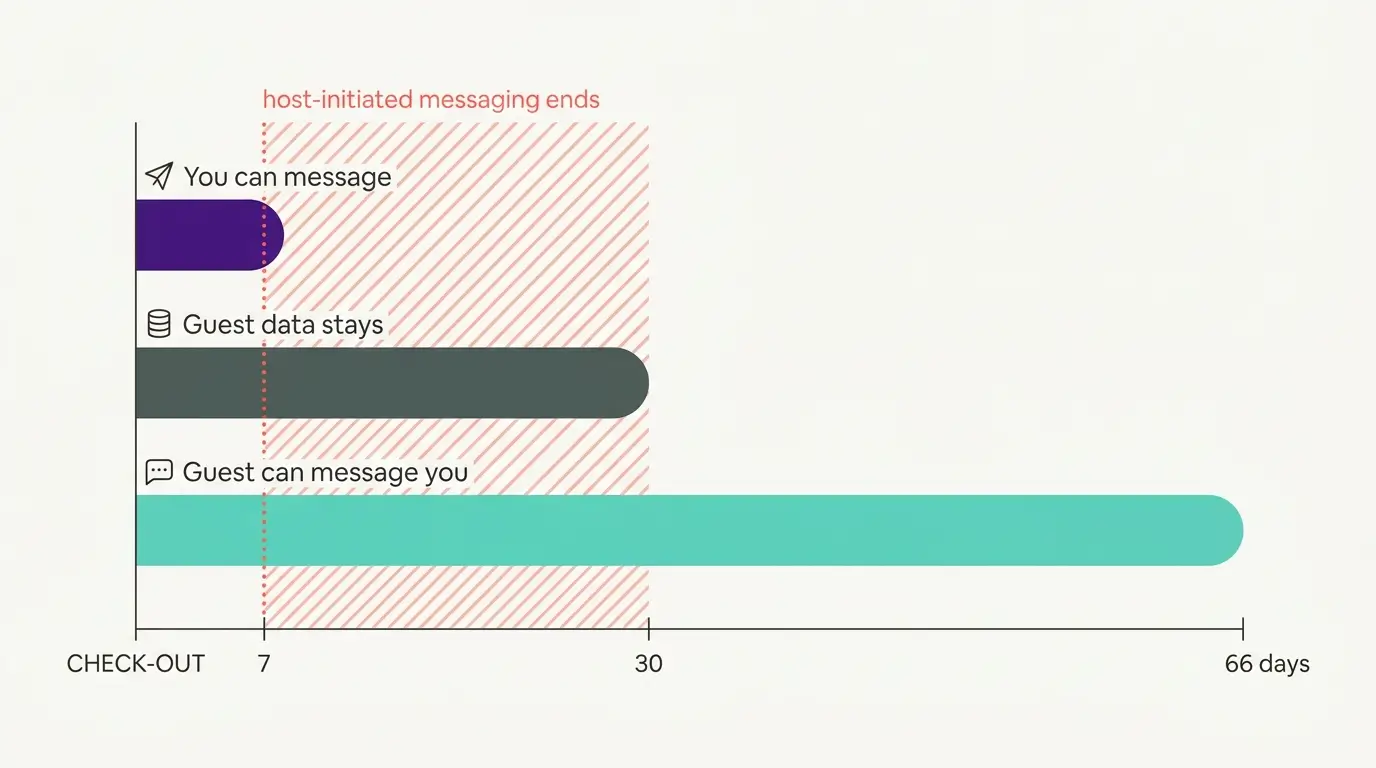
Booking.com Guest Messaging Rules: What Hosts Can Send, When, and Why Links Get Removed
Booking.com guest messaging rules, verified at source: how long you can message a guest, why your links get removed, and what the partner terms say.
Vrbo's New Features for Fall 2026: What's Live, What's Gated, and What's US-Only
We sorted Vrbo's new features for fall 2026: what is live globally, what is gated behind eligibility, and what is US-only. Verified against Vrbo's own pages.