One dashboard. Every property. Every guidebook.

One dashboard. Every property. Every guidebook.

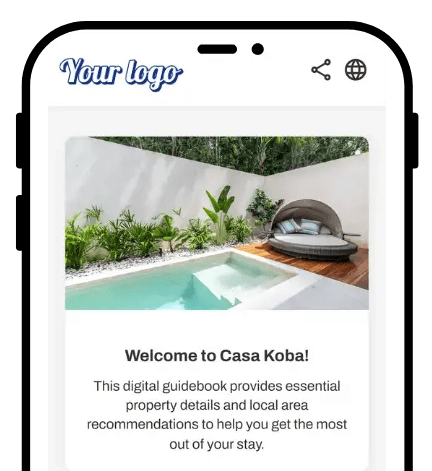
Run two properties or twenty from a single SmoothStay account. Share content across properties when it makes sense. Customize per property when it doesn't. Branding inherits or overrides as needed. Multi-property hosts get the leverage; their guests get a guidebook that feels purpose-built for the place they're in.

Run two properties or twenty from a single SmoothStay account. Share content across properties when it makes sense. Customize per property when it doesn't. Branding inherits or overrides as needed. Multi-property hosts get the leverage; their guests get a guidebook that feels purpose-built for the place they're in.

No credit card required

Cancel anytime

No credit card required

Cancel anytime

Avatar
Avatar
Avatar

Trusted by hosts in 18 countries

Avatar
Avatar
Avatar

Trusted by hosts in 18 countries

Multi-property management Guidebooks at Scale

Why It Matters

Share what makes sense. Customize what doesn't.

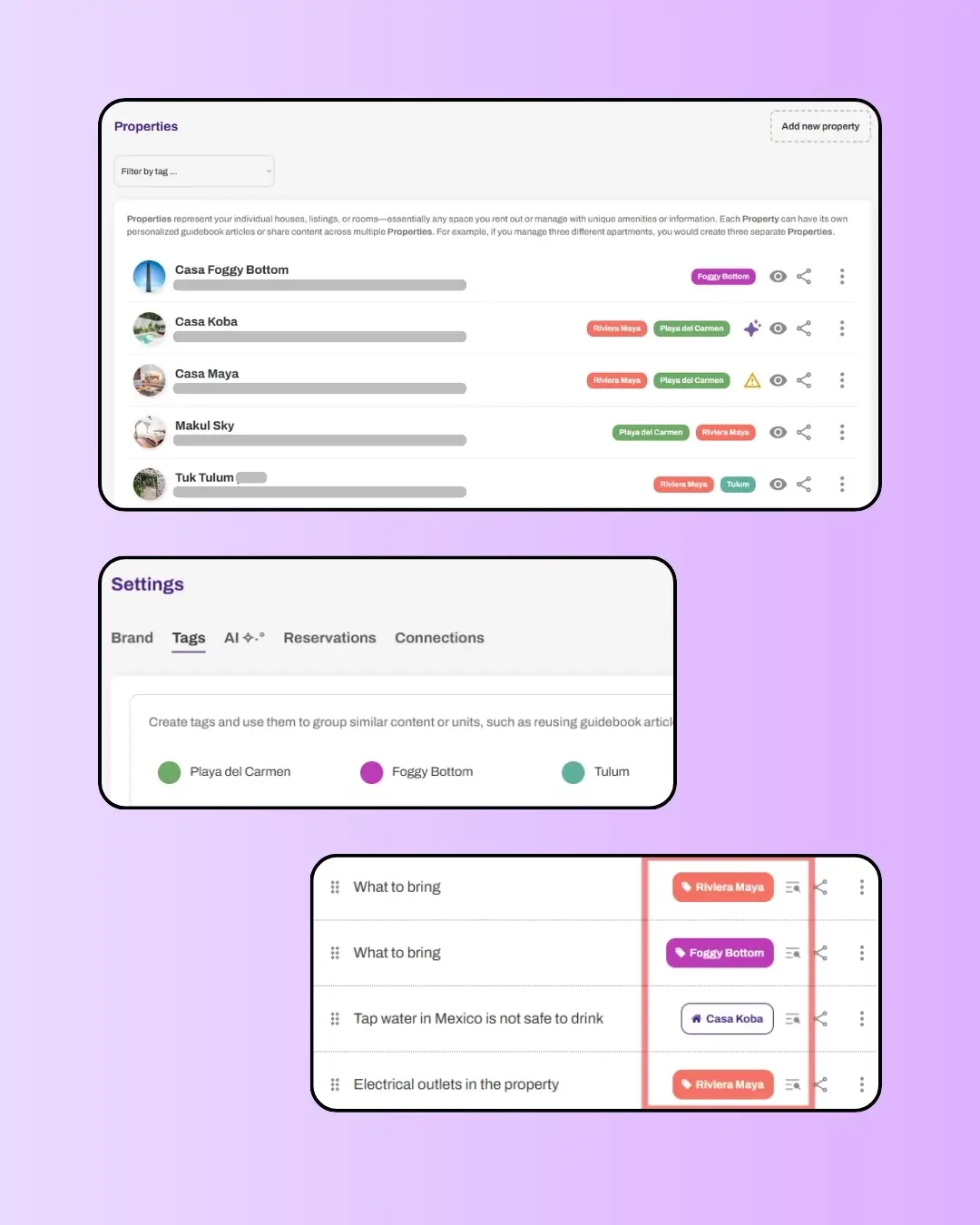
A typical multi-property host writes 40 to 60 articles across their portfolio — and the architecture is built to make that manageable. Articles that work everywhere — your welcome message with the property name filled in dynamically, your check-out steps, your house rules — get shared across properties via tags. Articles that should be property-specific — local recommendations, climate-specific tips, location-unique instructions — stay tied to a single property. You decide which is which on every article. Update the shared ones once; update the specific ones individually. The system supports both patterns without forcing one over the other.

Share what makes sense. Customize what doesn't.

A typical multi-property host writes 40 to 60 articles across their portfolio — and the architecture is built to make that manageable. Articles that work everywhere — your welcome message with the property name filled in dynamically, your check-out steps, your house rules — get shared across properties via tags. Articles that should be property-specific — local recommendations, climate-specific tips, location-unique instructions — stay tied to a single property. You decide which is which on every article. Update the shared ones once; update the specific ones individually. The system supports both patterns without forcing one over the other.

61% less than the alternative at scale

SmoothStay's pricing is built for multi-property hosts: $6.90/month for your first guidebook, then $2.90/month for each additional. At 10 properties, that's $33/month total — versus around $85/month on TouchStay's Starter plan. The savings compound with portfolio size. No per-property setup fees. No tier upgrades when you hit a property count threshold. Just transparent pricing that gets cheaper per unit as you grow.

61% less than the alternative at scale

SmoothStay's pricing is built for multi-property hosts: $6.90/month for your first guidebook, then $2.90/month for each additional. At 10 properties, that's $33/month total — versus around $85/month on TouchStay's Starter plan. The savings compound with portfolio size. No per-property setup fees. No tier upgrades when you hit a property count threshold. Just transparent pricing that gets cheaper per unit as you grow.

Your brand at the account level. Your property at the property level.

Set your brand identity once — logo, colors, default language, AI tone, OTA compliance — and every new property inherits it. Override anything per property when you need to: a different welcome message, different branding for a different brand, different language for a Spanish-only property. The account-level defaults give you consistency. The property-level overrides give you flexibility. Both layers, every time.

Your brand at the account level. Your property at the property level.

Set your brand identity once — logo, colors, default language, AI tone, OTA compliance — and every new property inherits it. Override anything per property when you need to: a different welcome message, different branding for a different brand, different language for a Spanish-only property. The account-level defaults give you consistency. The property-level overrides give you flexibility. Both layers, every time.

Built for hosts who scale, by hosts who scale.

  • Several digital guidebook tools treat each property as a separate guidebook copy. You set up the same articles for each one, maintain them in parallel, and watch them drift out of sync over time. SmoothStay was built differently — because we run multiple properties ourselves and we needed it to work.


  • The architecture is structured around three principles: share content where it makes sense, restrict content where it doesn't, and let the host decide which is which on every article. Welcome to your property might be one shared article that fills in the property name dynamically. What to bring might be five different articles — one per property — because Tulum's climate isn't Washington DC's. Local recommendations are always property-specific. The system supports both patterns equally, with tags for sharing, property restrictions for one-off content, and the Data Dictionary for dynamic details.


  • Branding follows the same flexibility. Set your account-level defaults once, and every new property inherits them. Override per property for the exceptions — a different brand, different colors, a different language. The defaults give you consistency. The overrides give you flexibility. You scale without losing either.


  • This is what multi-property infrastructure actually looks like — and the reason hosts running 5, 10, or 20 properties consistently choose SmoothStay over the alternatives.

How it Works

1

Add your properties

Create each property with a name, address, and basic profile. Properties are the unit your account is organized around — every guidebook, reservation, and share link is tied to a specific property.

2

Set your brand defaults once

In Brand Settings, set your default branding (logo, colors), default language, default AI tone, and default OTA compliance sources. Every new property inherits these defaults — no per-property setup required.

3

Decide what to share, what to keep specific

For content that works across properties, write one article and tag it with the relevant properties — use Data Dictionary placeholders for details that change per property. For content that's location-specific, write per-property and restrict visibility accordingly. The system supports both patterns; the choice is yours per article.

Pricing

Multi-property management is included on every paid plan, with pricing that compounds favorably as you scale.

All Premium Features

$6.90

USD

Guides

1

Need 30+ guidebooks? Get in touch for volume discounts.

No credit card required

Unlimited articles.

Add guidebooks at any time.

AI guest chatbot.

AI content assistant.

Guest registration

Your branding.

Automatic translation.

Advanced analytics.

Custom tags.

Advanced QR generator.

Embed unlimited images & videos.

Data dictionary.

Time-based access for guests.

Privacy controls.

OTA compliance tools

Share deep links.

All Premium Features

$6.90

USD

Guides

1

Need 30+ guidebooks? Get in touch for volume discounts.

No credit card required

Unlimited articles.

Add guidebooks at any time.

AI guest chatbot.

AI content assistant.

Guest registration

Your branding.

Automatic translation.

Advanced analytics.

Custom tags.

Advanced QR generator.

Embed unlimited images & videos.

Data dictionary.

Time-based access for guests.

Privacy controls.

OTA compliance tools

Share deep links.

All Premium Features

$6.90

USD

Guides

1

Need 30+ guidebooks? Get in touch for volume discounts.

No credit card required

Unlimited articles.

Add guidebooks at any time.

AI guest chatbot.

AI content assistant.

Guest registration

Your branding.

Automatic translation.

Advanced analytics.

Custom tags.

Advanced QR generator.

Embed unlimited images & videos.

Data dictionary.

Time-based access for guests.

Privacy controls.

OTA compliance tools

Share deep links.

How to Create Guidebook Content in a Multi-Property Setup

  • Tag your properties before you tag your articles. Decide your tag taxonomy early — by region (Playa del Carmen MX, Washington, DC), by property type (beachfront, urban), by brand, or by whatever logic fits your operation. Tag every property accordingly. Then when you write articles, the tagging decisions become obvious.


  • Choose flexibility over uniformity. Some articles work perfectly when shared — welcome messages, house rules, check-out steps. Others are property-specific by design — what to bring is different in Tulum versus Washington DC, local recommendations are unique to each location, what we provide may be similar but written specifically per property. A typical multi-property portfolio runs 40 to 60 articles total, a mix of shared and property-specific — not because the system forces it, but because that's what good hospitality looks like.


  • Use property-level overrides sparingly. The defaults handle most cases. Override only when something genuinely differs — a different brand, a different language, a different OTA channel mix. The fewer overrides you maintain, the easier your portfolio is to scale, audit, and update.

FAQs About Multi-Property Management

I'm migrating from another platform — how does that work?

Can different properties have different branding?

Does each property need its own guidebook, or can one guidebook serve multiple?

Can I duplicate a property to create a similar one?

How does content sharing actually work across properties?

How many properties can I add to my account?

FAQs About Multi-Property Management

I'm migrating from another platform — how does that work?

Can I duplicate a property to create a similar one?

Can different properties have different branding?

How does content sharing actually work across properties?

Does each property need its own guidebook, or can one guidebook serve multiple?

How many properties can I add to my account?

Related features

Scalable operations

Get Started for Free

Get Started for Free

Get Started for Free

No credit card. Cancel anytime. No apps to download.

No credit card. Cancel anytime. No apps to download.

Get started with SmoothStay
Logo SmoothStay

We’re here to smooth out your hosting journey—making guest experiences better and your work easier.

© 2023–2026 HelloBnB LLC. All rights reserved. SmoothStay™ is a registered DBA of HelloBnB LLC, a Wyoming limited liability company.

Mailing Address: 1007 N Orange St, 4th Floor, Suite 3246, Wilmington, DE 19801, United States.


SmoothStay is not affiliated with Airbnb, Inc, VRBO, or any other platform.

Logo SmoothStay

We’re here to smooth out your hosting journey—making guest experiences better and your work easier.

© 2023–2026 HelloBnB LLC. All rights reserved. SmoothStay™ is a registered DBA of HelloBnB LLC, a Wyoming limited liability company.

Mailing Address: 1007 N Orange St, 4th Floor, Suite 3246, Wilmington, DE 19801, United States.


SmoothStay is not affiliated with Airbnb, Inc, VRBO, or any other platform.

Logo SmoothStay

We’re here to smooth out your hosting journey—making guest experiences better and your work easier.

© 2023–2026 HelloBnB LLC. All rights reserved. SmoothStay™ is a registered DBA of HelloBnB LLC, a Wyoming limited liability company.

Mailing Address: 1007 N Orange St, 4th Floor, Suite 3246, Wilmington, DE 19801, United States.


SmoothStay is not affiliated with Airbnb, Inc, VRBO, or any other platform.