
7 Essential Airbnb Check Out Message Templates for Hosts in 2024
Master guest communication with our top 7 Airbnb check out message templates. Get actionable tips and examples to secure 5-star reviews every time.
Disclosure: Some links in this article are affiliate links. If you make a purchase, we may earn a commission at no extra cost to you. This helps support our content.
The final message you send your guests is more than just a formality—it's the last touchpoint that shapes their overall impression, helps secure your next 5-star review, and protects your property. A poorly worded or ill-timed airbnb check out message can undo all the goodwill you've built, leading to confusion, late departures, and even negative feedback. On the other hand, a clear, friendly message makes the process smooth, helps guests feel valued, and sets the stage for a glowing review.
Based on our decade of experience as Superhosts—managing everything from our 4-bedroom house in Washington, D.C., to a few beach properties in the Riviera Maya—we've found that a thoughtful checkout communication strategy is a must. This isn't just theory; it’s a practical system that reduces stress for both you and your guests and ensures a seamless turnover for your cleaning crew. A well-crafted message is your last, best chance to guide guests, gently reinforce house rules, and show them you care right up to the very end.
In this guide, we'll share the exact templates and strategies that have worked for us time and time again. We’ll cover everything from polite reminders and clear instructions to handling tricky situations like late checkouts. You'll get actionable examples you can copy, paste, and adapt for your own listings today, ensuring every guest leaves on a high note.
1. Polite Checkout Reminder Message
A polite checkout reminder is the foundation of a smooth departure. This gentle, well-timed message—usually sent the day before checkout—reminds guests of the departure time and key instructions without being pushy. It sets a professional yet friendly tone, encouraging them to be on time while keeping the host-guest relationship positive.
This simple message helps prevent the most common checkout issue: guests overstaying, which can cause a domino effect of delays for your cleaning crew and the next guests. It’s a proactive strategy that has consistently worked for us across our properties, whether it's our family home in D.C. or our beach condos in Mexico.
Why This Message is Essential
A polite reminder serves a few key purposes. It confirms the checkout time, gently nudges guests to review departure instructions, and opens a channel for any last-minute questions. This single message can prevent confusion, reduce the chance of a late checkout, and ensure your property is treated with respect.
Pro Tip: Think of this message as a helpful courtesy, not a demand. Frame it as part of your service to ensure their departure is as seamless as their arrival. From our experience, a positive final interaction often leads directly to a 5-star review.
Template Examples to Use
Your Airbnb check out message should be warm, clear, and concise. Personalization is key, so always try to use the guest's name.
Example 1: The Simple & Friendly Reminder
"Hi [Guest Name], we hope you've had a wonderful time! This is just a friendly reminder that checkout is tomorrow at 11:00 AM. We appreciate you keeping to our checkout time so our cleaning team can prepare the space for our next guests. Safe travels!"
Example 2: The Action-Oriented Reminder
"Hi [Guest Name], thanks again for staying with us! As a quick heads-up, checkout is tomorrow morning at 10:00 AM. When you leave, please ensure all windows are closed and the door is locked. We hope you made some great memories!"
Actionable Tips for Implementation
Timing is Everything: Send the message 24 hours before the scheduled checkout. For longer stays (a week or more), a 48-hour reminder can also work well.
Personalize It: Always address the guest by name. Most messaging tools can do this for you automatically.
Include Key Details: State the exact checkout time. Avoid vague terms like "checkout is in the morning."
Link to Full Instructions: Instead of listing every rule, you can include a simple link to your digital guidebook's checkout section. You might say, "For a full list of our simple checkout steps, you can visit our digital guide here."
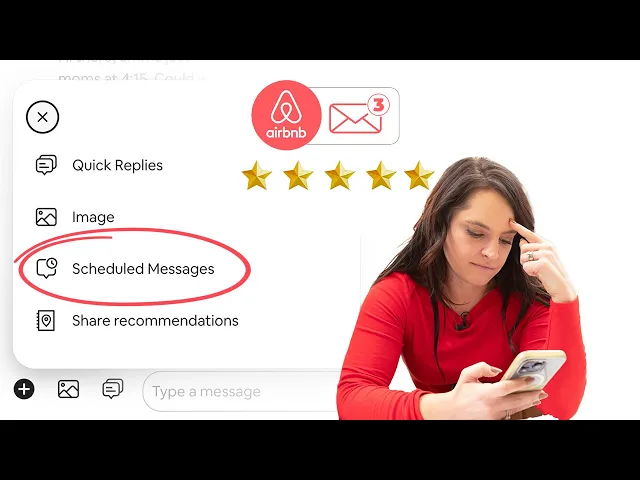
Automate for Consistency: Using a tool to schedule these messages ensures no guest is ever missed. You can learn more about how to automate your Airbnb messages and save valuable time.
2. Self-Checkout Instructions Template
A self-checkout instructions template helps guests manage their own departure, creating a seamless, contactless experience. This step-by-step guide clearly outlines all the required tasks, from locking up to adjusting the thermostat. It’s especially valuable if you manage properties remotely or prefer a hands-off approach, as it ensures things are done consistently without you needing to be there.
This method cuts down on ambiguity and reduces the back-and-forth questions that can pop up on departure day. By providing a clear checklist, you empower guests and significantly reduce the chance of missed steps, which helps your cleaning team turn the property over faster. Across our own properties, a clear self-checkout guide has been a game-changer for efficiency.
Why This Message is Essential
A detailed self-checkout message acts as a final, comprehensive guide for your guests. It bundles all the necessary departure tasks into one easy-to-follow format, which is helpful for guests who are busy packing and planning their travel. This clarity not only ensures your property is left in good condition but also leaves a professional final impression.
Pro Tip: Structure your instructions as a simple checklist. The satisfaction of "checking off" tasks, even mentally, makes the process feel more manageable and less like a list of chores. We've found this encourages better compliance.
Template Examples to Use
Your Airbnb check out message for self-checkout should be organized and easy to scan. Numbered lists or checklists are much more effective than long paragraphs.
Example 1: The Numbered List
"Hi [Guest Name], we hope you had a fantastic stay! To help with your departure tomorrow at 11:00 AM, here is a quick self-checkout checklist:
Please place all used towels in the laundry basket.
Load and start the dishwasher with any remaining dishes.
Take all trash to the large green bin outside.
Set the thermostat to 72°F.
Lock all windows and doors. Thank you for being a wonderful guest. Safe travels!"
Example 2: The Interactive Checklist
"Hi [Guest Name], as you prepare for your 10:00 AM checkout tomorrow, here’s a simple checklist in our digital guide to ensure a smooth departure: [Link to Guidebook Checklist]. Just tap each item as you complete it. We truly appreciate your help in preparing for our next guests!"
Actionable Tips for Implementation
Use a Numbered List or Checklist: This format is scannable and much easier for guests to follow than a block of text.
Include Property-Specific Details: Don't just say "take out the trash." Specify "take trash to the large green bin at the side of the house." Add photos in your digital guide for extra clarity.
Create a Short Video Tutorial: A 2-minute video showing how to operate the smart lock, adjust the thermostat, or find the trash bin can prevent confusion. You can easily embed this in your guidebook.
* **Automate with Purpose:** Use a platform like SmoothStay to send these detailed instructions within your 24-hour checkout reminder. You can create a template with property-specific details that automatically populates for each booking.
* **Request Confirmation:** A simple "Please send us a quick message once you've departed" at the end of your instructions lets you know exactly when the property is vacant and ready for cleaning.
3. Late-Checkout Handling Message Template
A late-checkout handling message is a tool for addressing guests who haven't departed on time. This message helps you manage an awkward situation professionally, offering solutions like a paid extension while protecting your cleaning schedule. It’s a delicate balance of hospitality and business reality, designed to resolve the issue without escalating conflict.
Overstaying guests can throw your entire operation into chaos, delaying cleaners and impacting the check-in for your next guests. Having a pre-written, calm, and solution-oriented message ready allows you to take immediate control. This approach has been essential for us, especially in high-turnover properties where every minute counts.
Why This Message is Essential
This message is your first line of defense against schedule disruptions. It addresses the overstay right away and clarifies the situation for the guest (who may have simply lost track of time), presenting clear options. By framing the conversation around solutions rather than problems, you can maintain a positive dynamic while enforcing your house rules.
Pro Tip: If possible, position the late checkout as a premium service you can offer, not a penalty. This reframes the conversation from a negative ("You're late") to a positive ("We might be able to offer you more time"), which is far more likely to result in a cooperative outcome.
Template Examples to Use
Your Airbnb check out message for late departures should be firm, fair, and sent quickly. Lead with a solution before mentioning fees, and always provide a clear call to action.
Example 1: The Solution-First Offer
"Hi [Guest Name], this is a gentle follow-up as our checkout time was at 11:00 AM. We understand plans can change. If you need more time, we can offer a late checkout until 1:00 PM for a $35 fee, if our schedule allows. Please let us know in the next 10 minutes if you'd like to check so we can try to adjust our cleaning schedule. Thanks!"
Example 2: The Urgent & Clear Approach
"Hi [Guest Name], I hope you enjoyed your stay. I’m writing because checkout was at 10:00 AM, and our cleaning team is scheduled to arrive shortly. To avoid disrupting their schedule, please let us know your status. A late checkout may be available for an additional fee, but we need to confirm immediately."
Example 3: The Goodwill Extension
"[Guest Name], thanks again for staying with us! We noticed you haven't checked out yet, and our checkout time is 11 AM. We're happy to offer a complimentary 30-minute extension if you let us know now. After that, our standard late-checkout fee of $50 applies to cover rescheduling costs. Please let us know how we can help!"
Actionable Tips for Implementation
Be Proactive: Mention your late checkout policy and any associated fees in your house rules and pre-arrival messages. Transparency is key.
Act Quickly: Send this message 10-15 minutes after the scheduled checkout time has passed. The sooner you address it, the better.
Offer a Solution First: Always lead by offering a potential solution, like a paid extension. This is less confrontational than immediately demanding the guest leave.
Reference Your Schedule: Gently mentioning your cleaning team's arrival adds urgency and explains why the checkout time is important.
Document Everything: Keep all communication within the Airbnb platform. This creates a record that can help in case of a dispute.
Automate Policies: Use a tool like SmoothStay to include your late checkout policies directly in your digital guidebook. This way, guests have easy access to the information from the start.
4. Key and Lockbox Return Message Template
A location-specific message detailing how to return keys, fobs, or garage remotes is essential for property security. This communication, sent as part of the checkout process, provides crystal-clear instructions to ensure you regain control of all access devices promptly. It’s a critical step in preventing costly lockouts, unauthorized re-entry, and security issues between stays.
This message isn’t just about getting your keys back; it’s about creating a documented handoff that protects your property. For our rentals with physical keys, this process has been instrumental in maintaining a secure environment for every guest. It closes the loop on the guest's stay and ensures a smooth transition for your cleaning crew and the next arrival.
Why This Message is Essential
A dedicated key return message removes ambiguity, which is the enemy of a secure checkout. It tells guests exactly what to do and where to do it. This proactive communication drastically reduces the chances of a guest accidentally taking a key home or leaving it in an insecure location, saving you the headache and expense of a last-minute locksmith.
Pro Tip: Requesting photo confirmation is a simple but powerful security measure. Asking guests to send a quick picture of the key inside the lockbox creates a time-stamped visual record of a successful return, which can be invaluable if a dispute arises.
Template Examples to Use
Your Airbnb check out message for key returns must be precise and easy to follow. Vague instructions often lead to lost keys.
Example 1: The Multi-Option Return
"Hi [Guest Name], we've truly enjoyed hosting you! Before you check out, please return the key using one of these options:
Place it back in the lockbox on the front porch railing (the code is [CODE]).
Leave it with the receptionist at the front desk (open 9 AM–5 PM). Please send us a quick message to confirm once it's done. Safe travels!"
Example 2: The High-Security Confirmation
"Hi [Guest Name], as a final step for checkout at 11:00 AM, please return the key card to the lockbox by the gate. To open it, use code [CODE]. After placing the card inside, kindly send a photo of the closed lockbox to confirm. If you've misplaced the card, please call us immediately at [NUMBER]. Thank you!"
Example 3: The Detailed with Consequences
"Hi [Guest Name]! As part of checkout, please:
Return the front door key to the magnetic lockbox located behind the large green planter to the right of the door.
Ensure the garage remote is left on the kitchen counter.
Send us a quick photo confirmation of the key in the lockbox. Please note that per our house rules, a fee of $150 will be charged to re-key the property if keys are not returned. Thank you for your cooperation!"
Actionable Tips for Implementation
Be Hyper-Specific: Don’t say "by the entrance." Instead, say "in the black lockbox attached to the left-side railing of the front porch."
Request Photo Proof: Ask guests to send a picture of the key in the lockbox. This simple step confirms completion and protects you from false claims.
Specify Consequences: Clearly state the fee for lost or unreturned keys in your house rules and gently reference it in your message. This encourages compliance.
Automate Reminders: Use a platform like SmoothStay to send automated reminders about key returns 24 hours and 2 hours before checkout. This ensures the instruction is top-of-mind.
Reset Codes Immediately: For digital or manual lockboxes, make it a standard procedure to change the code after every checkout.
Provide an Emergency Contact: Always include a phone number for guests to call immediately if they realize a key is lost.
5. Cleaning and Damage Reminder Message Template
A cleaning and damage reminder message is a proactive way to protect your property and set clear expectations for how guests should leave your space. Sent before checkout, this message gently reminds guests of their responsibilities and prompts them to report any accidental damage. This isn't about being confrontational; it's about establishing accountability and creating a transparent process.

This type of Airbnb check out message is crucial for maintaining your property's value and streamlining turnovers. It creates a documented line of communication, which is invaluable if you need to make a claim. By clearly outlining what is expected, you minimize misunderstandings and encourage guests to treat your home with respect.
Why This Message is Essential
This message serves two main functions: it mitigates the risk of undisclosed damage and clarifies your cleaning expectations. It gives guests an opportunity to be honest about mishaps, turning a potentially negative situation into a cooperative one. For hosts, it provides the documentation needed to support a resolution request through Airbnb, making the process smoother.
Pro Tip: Frame this message as a partnership. Emphasize that reporting damage promptly helps you resolve issues quickly for them and for future guests. This collaborative tone is far more effective than an accusatory one.
Template Examples to Use
Your message should be firm but fair, clearly stating expectations without sounding accusatory.
Example 1: The Direct & Clear Approach
"Hi [Guest Name], as your checkout tomorrow at 11:00 AM approaches, please help us keep our home in great condition. We just ask that you leave the space tidy (dishes done, trash removed). If any accidental damage occurred during your stay, like a broken glass or a new stain, please let us know now so we can address it together. Thanks for taking care of our home!"
Example 2: The Checklist Format
"Hi [Guest Name], here are our simple checkout cleaning expectations:
✓ Strip used beds & place linens by the laundry machine.
✓ Wash all dishes and run the dishwasher.
✓ Bag all trash and place it in the outdoor bin.
Have you noticed any damage? Please send us a quick photo and description now so we can handle it smoothly. We truly appreciate your help!"
Actionable Tips for Implementation
Be Specific: Vague requests like "please clean up" are ineffective. Use a checklist to define exactly what you mean (e.g., "wipe down kitchen counters," "sweep floors"). For hosts looking to provide detailed cleaning expectations, an ultimate end of lease cleaning checklist can offer a comprehensive guide.
Reference Your Policies: You can gently refer to your house rules regarding the security deposit and damage policy. This reinforces that these are pre-established terms.
Differentiate Cleaning Levels: Clearly distinguish between the basic tidying you expect from guests and the professional deep cleaning handled by your team. This helps manage expectations and is a key part of an efficient vacation rental turnover cleaning process.
Document Everything: Ask guests to send photos of any damage. After they depart, take your own time-stamped photos of the property's condition for comparison.
Automate the Request: Use a platform like SmoothStay to schedule this message to send 12-24 hours before checkout. This ensures the information is delivered consistently and at the right time.
6. Thank You and Follow-Up Message Template
The final interaction with a guest is just as important as the first. A warm, appreciative post-checkout message humanizes the hosting experience, reinforces a positive impression, and strategically opens the door for private feedback. Sent shortly after a guest departs, this message thanks them for their stay and for respecting your property, shifting the dynamic from a transaction to a relationship.
This simple gesture can be the difference between a 4-star review with public complaints and a 5-star review with private suggestions for improvement. In our experience, this final touchpoint has consistently fostered goodwill, encouraged repeat bookings, and protected our Superhost status by creating a safe channel for guests to share constructive feedback.
Why This Message is Essential
A thank you message accomplishes several key goals. It confirms you’ve acknowledged their departure, shows appreciation for how they treated your home, and gives them an opportunity to mention any issues directly to you before they write their public review. It’s a proactive customer service move that shows you care about their experience even after their stay is over.
Pro Tip: Position this message as a final act of hospitality. By inviting direct feedback, you show guests you are a committed host who values their input, which makes them more likely to share minor issues privately and praise you publicly.
Template Examples to Use
Your Airbnb check out message should feel personal and sincere. Mentioning a small detail from their stay can make it feel less like a template and more like a genuine note.
Example 1: The Simple & Sincere Thank You
"Hi [Guest Name], it was wonderful having you stay with us! Thank you so much for taking great care of our home—it means a lot to us. We'd love to welcome you back anytime. Safe travels!"
Example 2: The Feedback-Oriented Thank You
"Hi [Guest Name]! We hope you had an amazing stay at [Property Name]. We appreciated how tidy you left the place. If there's anything we can do to improve, please don't hesitate to let us know. Thanks again for choosing us!"
Example 3: The Personalized Thank You
"[Guest Name], thank you for being such wonderful guests! We were so glad to hear you enjoyed [specific activity/area they mentioned]. We really appreciated how respectfully you treated our home. Have a safe journey, and we hope to host you again!"
Actionable Tips for Implementation
Timely Delivery: Send this message within 1-2 hours of checkout, once your cleaning team has confirmed the guest has departed and the property is in good order.
Personalize Genuinely: Use the guest's name and reference a specific, positive detail from their stay or communications if you can.
Invite Private Feedback: Use phrases like, "If anything wasn't perfect, please let us know directly" to encourage private communication.
Keep It Warm, Not Intrusive: Maintain a professional yet friendly tone. Avoid making a hard push for a review in this message; that comes next.
Automate with Care: You can use a platform like SmoothStay to schedule this message. Using dynamic tags like
[Guest Name]and[Property Name]ensures consistency and personalization without manual effort.
7. Review Request Message Template
A review request is your final, crucial touchpoint with a guest, turning a great stay into a lasting asset for your business. This well-timed, friendly message encourages guests to leave a positive review on Airbnb or other platforms. It balances genuine appreciation with a clear, gentle call-to-action, making the review process easy for your departed guest.
Positive reviews are the lifeblood of a short-term rental business, directly impacting visibility, booking rates, and your ability to achieve Superhost status. A well-crafted Airbnb check out message focused on requesting a review can significantly boost your social proof and build trust with future travelers.
Why This Message is Essential
This message serves a single, powerful purpose: to convert a guest's positive experience into a public review. It reminds them while their memory is fresh, explains the value of their feedback, and provides a direct path to the review page. This simple prompt can be the difference between a silent, happy guest and one who becomes an advocate for your property.
Pro Tip: Frame your request around their experience and its value to future travelers, not your need for a review. Phrasing it as "helping other travelers find a great place" or "sharing your experience" feels collaborative and less transactional, increasing the likelihood of a thoughtful response.
Template Examples to Use
Your review request should be brief, heartfelt, and easy to act on. Always include a direct link to the review page to remove any friction.
Example 1: The Simple & Grateful Request
"Hi [Guest Name], we truly hope you enjoyed your stay! We'd be so grateful if you could take two minutes to leave a review. Your feedback helps other travelers discover our home and helps us continue to improve. Thank you so much!"
Example 2: The Small Business Angle
"Hi [Guest Name]! We hope you loved your time with us. If you did, we'd be thrilled if you'd share your experience. As a small business, reviews from wonderful guests like you make all the difference. We appreciate your support!"
Actionable Tips for Implementation
Timing is Key: Send this message 24 to 48 hours after checkout. This gives the guest time to settle back home but ensures the positive memories of their stay are still fresh.
Reduce Friction: Make it as easy as possible. Airbnb automatically prompts for reviews, so your message is a friendly nudge.
Emphasize Impact: Briefly mention how their review helps, for example, "it helps other travelers discover us" or "your feedback is invaluable for our improvement."
Platform-Specific Language: Tailor your message for the platform (e.g., "Airbnb review," "VRBO rating").
Never Incentivize: It is against Airbnb's policy to offer compensation for positive reviews. Keep your request genuine.
Automate the Process: You can use a tool like SmoothStay to schedule this message to send automatically after every checkout. For more strategies, you can learn more about how to get good reviews on Airbnb.
7-Point Airbnb Checkout Message Comparison
Template | 🔄 Implementation Complexity | ⚡ Resource Requirements | 📊 Expected Outcomes | 💡 Ideal Use Cases | ⭐ Key Advantages |
|---|---|---|---|---|---|
Polite Checkout Reminder Message | Low — single automated message 24h prior | Minimal — messaging platform, dynamic tags | Clearer expectations; higher on-time checkout rates | Short stays, guest-friendly properties, high-touch hosts | ⭐⭐⭐⭐ — polite compliance, preserves goodwill |
Self-Checkout Instructions Template | Medium — structured, multimedia content | Moderate — photos/videos, guidebook, QR/checklist tools | Fewer host interventions; consistent turnovers | Contactless stays, multi-property managers, complex lock systems | ⭐⭐⭐⭐⭐ — reduces workload, prevents errors, scalable |
Late-Checkout Handling Message Template | Medium — timed triggers + escalation rules | Low–Medium — messaging + fee policies, support protocol | Protects schedule; recovers revenue; reduces conflicts | High-turnover listings, tight cleaning windows | ⭐⭐⭐⭐ — enforces boundaries, offers flexible solutions |
Key and Lockbox Return Message Template | Medium — location-specific + confirmation flow | Medium — lockboxes, photo confirmations, logistics | Fewer security incidents; avoids re-key costs | Properties with physical keys, high-security needs | ⭐⭐⭐⭐ — protects access control, creates accountability |
Cleaning and Damage Reminder Message Template | Medium — detailed checklist + reporting channels | Medium — photo guidance, damage report form, documentation | Better condition on departure; stronger damage claims | High-value properties, stays with deposits, insurance-aware hosts | ⭐⭐⭐⭐⭐ — prevents disputes, preserves property value |
Thank You and Follow-Up Message Template | Low — post-checkout automated/personalized | Minimal — personalization tokens, timing trigger | Increased guest goodwill and likelihood of positive reviews | Boutique hosts, repeat-guest strategies, relationship-driven stays | ⭐⭐⭐⭐ — builds rapport, opens feedback channels |
Review Request Message Template | Low — timed message with links/QRs | Minimal — platform links, brief personalization | Higher review volume and improved visibility | New listings, competitive markets, reputation growth efforts | ⭐⭐⭐⭐⭐ — boosts social proof and booking performance |
Turn Your Checkout into Your Greatest Strength
The checkout process is far more than a simple goodbye; it's the final, lasting impression you leave with your guests. It’s the last touchpoint in their journey and your final opportunity to solidify a 5-star experience. Throughout this guide, we've shared a variety of templates, from the gentle polite reminder to the clear instructions for cleaning and key returns. Each message is a tool designed not just to inform, but to build trust, prevent misunderstandings, and guide your guests toward a smooth, stress-free departure.
Mastering the airbnb check out message is a strategic advantage. It transforms a potentially chaotic moment into a streamlined, professional process that reflects the quality of your hospitality. By implementing the right message at the right time, you are proactively managing expectations, reducing the likelihood of late checkouts, and setting the stage for a positive review. This isn't just about getting the keys back; it’s about reinforcing the care and attention to detail that defined the guest's entire stay.
Key Takeaways for a Flawless Checkout
Let’s distill the core principles from the examples we've covered:
Clarity is Kindness: Vague instructions create confusion. Your messages should be direct, concise, and easy to follow. Use simple language and bullet points to ensure nothing gets lost.
Timing is Everything: Sending a message too early can feel intrusive, while sending one too late is ineffective. A well-timed message, typically the evening before departure, strikes the right balance.
Personalization Builds Connection: Even a small touch, like using the guest's first name, makes your automated communication feel more human. It shows you see them as a person, not just a reservation number.
Actionable Next Steps for Hosts
Now it’s time to put these insights into practice. Start by reviewing your current checkout communication. Identify one or two message templates from this article that you can implement immediately. Perhaps you need a clearer self-checkout instruction message or a more structured review request.
Once you’ve chosen your templates, customize them to fit your property’s specific needs and your unique hosting style. Load them into your Airbnb saved replies or your preferred messaging software. For hosts aiming to scale or simply optimize their time, leveraging virtual property management solutions can transform the entire checkout process, turning it into a seamless experience for both you and your guests. The goal is to create a system that is both efficient for you and reassuring for your guests.
Ultimately, a polished checkout process is a hallmark of a professional host. By refining your airbnb check out message strategy, you're not just closing out a booking; you're building a reputation that encourages repeat visits and glowing recommendations. The final words you share with your guests are just as important as the first ones. Make them count.
Ready to automate your guest communication and deliver a 5-star experience without the manual effort? SmoothStay lets you create customizable, professional guidebooks and schedule personalized messages, including your perfected checkout instructions. Built by hosts for hosts, it's designed to save you time and delight your guests. See how at SmoothStay today.